In this article
Why the cable outlives everything else
Switches get replaced every five to seven years. Access points every four to six. Cameras when the resolution stops being adequate. The cable in your walls, ceilings and conduit is expected to outlast all of it — often two or three hardware generations.
That asymmetry drives the single most useful rule in cabling: the cable is cheap, the labour is not. On a typical commercial run, materials are a modest share of the installed cost. Choosing a higher category adds a little to the material line and nothing to the labour, while pulling cable a second time costs the whole job again — plus the disruption of working in an occupied building.
The categories, honestly compared
| Category | Bandwidth | 1 Gbps | 10 Gbps | Shielding | Sensible use in 2026 |
|---|---|---|---|---|---|
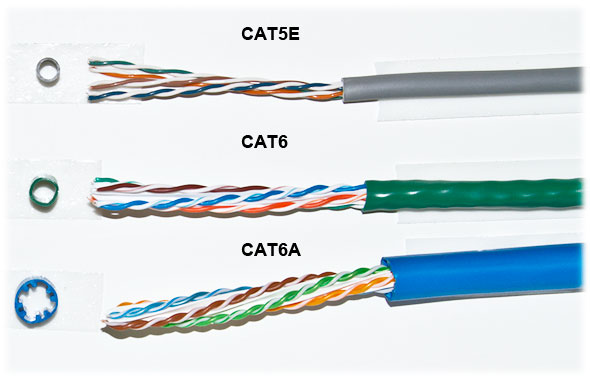
| Cat5e | 100 MHz | 100 m | Not supported | Usually UTP | Legacy voice, low-demand drops. Not for new data runs. |
| Cat6 | 250 MHz | 100 m | ~37–55 m | UTP or F/UTP | Standard office workstation drops |
| Cat6A | 500 MHz | 100 m | 100 m | Usually shielded | Access points, cameras, anything with a long horizon |
| Cat7 / Cat7A | 600–1000 MHz | 100 m | 100 m | S/FTP | Rare in North America — non-standard connectors, little benefit over 6A |
| Cat8 | 2000 MHz | 100 m | 25–40 Gbps to 30 m | S/FTP | Data-centre top-of-rack only. Not a building cable. |
What the numbers actually mean
Bandwidth in MHz is the frequency range the cable is tested and certified across — it is not the data rate. Higher bandwidth means the cable can carry more complex signalling reliably, which is what allows the same 100 metres to carry ten times the data.
The Cat6 10 Gbps figure deserves attention: Cat6 can do 10 Gbps, but only to roughly 37–55 metres depending on installation quality and alien crosstalk in the bundle. If you specify Cat6 and later want 10 Gbps at the far end of the floor, you will not get it. Cat6A carries 10 Gbps the full 100 metres, which is the entire reason it exists.
PoE, heat and the thing most people miss
Power over Ethernet has quietly become the dominant reason to specify better cable, and it has nothing to do with data rates.
Running power through copper generates heat. In a single cable that is trivial. In a bundle of forty-eight cables in a conduit, all delivering PoE++ to access points and cameras, the cables in the centre of the bundle cannot shed heat and their temperature rises. Higher temperature increases insertion loss, and beyond roughly 20°C above ambient you start losing usable length.
| Standard | Name | Power at source | Typical loads |
|---|---|---|---|
| 802.3af | PoE | 15.4 W | VoIP phones, basic cameras |
| 802.3at | PoE+ | 30 W | WiFi 5/6 APs, PTZ cameras |
| 802.3bt Type 3 | PoE++ | 60 W | WiFi 6E/7 APs, heated cameras, displays |
| 802.3bt Type 4 | PoE++ | 90–100 W | Lighting, thin clients, large displays |
Cat6A's larger conductors and better construction dissipate heat more effectively than Cat5e or Cat6, which is why it is the sensible default anywhere PoE++ will run. Practical mitigations we apply on every job: keep bundles to 24 cables or fewer, avoid stacking bundles in fully enclosed conduit, and de-rate length in hot ceiling spaces.
The failure mode is sneaky
PoE heat problems do not usually announce themselves. They show up as an access point that reboots intermittently in summer, or a camera that drops when the roof space heats up in the afternoon. It gets blamed on the device for months.
When to use fiber instead
Fiber is not a premium copper. It is the answer to three specific problems copper cannot solve.
- Distance. Copper stops at 100 metres. Multimode OM4 runs 400 metres at 10 Gbps; single-mode OS2 goes for kilometres.
- Electrical isolation. A copper run between two buildings creates a bonding path between separate electrical systems — a genuine lightning and ground-loop hazard. Fiber carries light, so the problem disappears.
- Interference immunity. Near large motors, welders, VFDs or high-voltage runs, fiber is unaffected by electrical noise that copper picks up.
| Type | Core | 10 Gbps reach | Typical use |
|---|---|---|---|
| OM3 multimode | 50 µm | 300 m | In-building backbone (legacy installs) |
| OM4 multimode | 50 µm | 400 m | In-building backbone, current standard |
| OS2 single-mode | 9 µm | 10 km+ | Campus, inter-building, anything crossing property |
Our standing advice: anything leaving a building goes single-mode. Optics are inexpensive now, and single-mode removes distance and bandwidth as future constraints permanently.
Certification: the part you must not let go
There are three levels of testing, and only one of them is worth anything as a guarantee.
- Continuity / wire map. A cheap tester confirms the eight conductors reach the right pins in the right order. It proves the run is not miswired. It proves nothing about performance.
- Qualification. Mid-tier testers confirm the link can support a stated speed — useful for troubleshooting, not a certification.
- Certification. A calibrated field tester measures insertion loss, NEXT, PSNEXT, return loss, ACR-F, delay skew and more against the TIA standard for the category, and issues a pass/fail per link with the full data.
Certification is what you pay for and what you should receive. Every link, tested, with the report handed over. If a link fails, it gets re-terminated and re-tested before handover — not noted as "marginal".
One question worth asking
"Will you provide certification test results for every run?" A contractor who hesitates is telling you they do not own a certifier, which means nobody will ever know whether your cabling met the standard you paid for.
Where installations actually go wrong
Certification catches electrical faults. These are the workmanship failures that pass a test today and cost you later:
- Excess untwist at termination. Standards allow half an inch of untwist for Cat6. Sloppy termination undoes an inch or more and destroys crosstalk performance at the connector — the most common cause of a marginal certification result.
- Bend radius violations. Tight bends and cable stapled hard against a joist deform the geometry that makes the cable work. Minimum bend radius is four times the cable diameter.
- Overtensioned pulls. Pulling above 25 lbf stretches conductors and permanently alters twist rates. The damage is invisible.
- Cable ties cinched tight. Deforms the jacket and the pairs beneath. Hook-and-loop, snug not tight.
- No labelling. Every run should be labelled at both ends and on the patch panel, matching an as-built document. Its absence costs someone hours on every future fault.
- Running alongside power. Maintain separation from AC lines and cross at right angles where crossing is unavoidable.
- No service loop. A few feet of slack in the ceiling near each drop lets a future technician re-terminate rather than re-pull.
How to specify a job so you get what you expect
Put these in writing and most disputes disappear:
- Category and manufacturer for cable, jacks, patch panels and patch cords — mixing brands within a channel can void the system warranty
- Plenum-rated cable in air-handling spaces, riser-rated in vertical shafts (this is code, not preference)
- Certification testing on 100% of links, results delivered as a file
- A labelling scheme, specified before work starts
- As-built drawings showing drop locations and panel positions
- Manufacturer system warranty registration where offered (commonly 25 years)
- Cat6A minimum to all access points and PoE++ cameras
- Bundle size limits and separation from power
None of this is exotic — it is what a professional contractor does anyway. Writing it down simply means you can tell in advance which kind you have hired.
Want a cabling job specified and certified properly? See how we do it.
Need this done in your building?
We survey, design, install and support commercial networks across Greater Los Angeles. Request a consultation or call 626-289-0188.