In this article
- Why a separate SSID is not segmentation
- A VLAN layout that works for most businesses
- Client isolation and what it does not cover
- Captive portals: useful, and easy to overdo
- Bandwidth policy: protect the business first
- Security settings worth insisting on
- Seven mistakes we see repeatedly
- What good looks like
Why a separate SSID is not segmentation
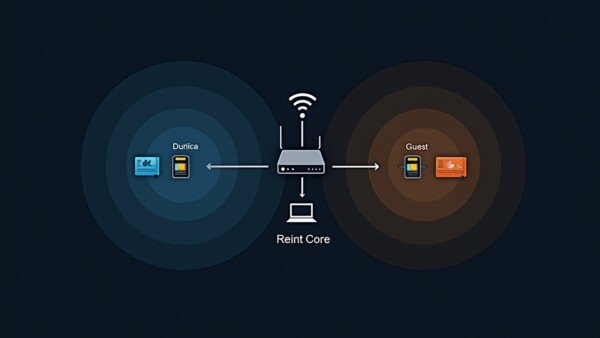
The most common mistake we find is a business that has created a second wireless network called "Guest" and considers the job done. If both SSIDs land on the same VLAN and the same subnet, a guest device sits on the same network as your file server, your POS terminals and your cameras. The different name changes nothing about what the device can reach.
Real segmentation means guest traffic lives on its own VLAN, with its own subnet, and firewall rules that allow it to reach the internet and nothing else on your network. That is a configuration decision at the switch and gateway, not a wireless setting.
A quick self-test
Connect a phone to your guest WiFi and try to open your printer's or NVR's admin page by IP address. If it loads, your guest network is not segmented — it is just differently named.
A VLAN layout that works for most businesses
You do not need a complicated scheme. Five or six segments cover almost every commercial site we work in:
| VLAN | Purpose | Can reach |
|---|---|---|
| Management | Switches, access points, gateway, controller | Nothing outbound except updates; reachable only from admin |
| Corporate | Staff laptops, desktops, servers, printers | Internet and internal resources |
| Voice | VoIP phones and conferencing hardware | Internet and PBX, prioritised |
| Guest | Visitor devices | Internet only, clients isolated from each other |
| IoT | Thermostats, signage, TVs, sensors, smart plugs | Internet only, no lateral access |
| Cameras / security | Cameras, NVR, access control | Internal recorder only, no internet for cameras |
The IoT segment matters more than people assume. Smart devices are the least maintained, least patched things on any network — a smart TV or a signage player is an unmanaged computer with an outdated browser. Keeping them away from everything else is cheap insurance.
Client isolation and what it does not cover
Client isolation stops devices on the guest network from communicating with each other. It should always be on for guest WiFi — it prevents one compromised laptop in your waiting room from scanning and attacking every other visitor's phone.
What it does not do:
- It does not stop traffic reaching other VLANs — that is the firewall's job
- It does not encrypt traffic between the device and the access point on an open network
- It does not prevent a device from reaching the internet and doing whatever it likes there
One practical wrinkle: isolation breaks casting and AirPlay, because those depend on device discovery. In hotels and conference spaces where guests expect to cast to a room display, the answer is per-room or per-session isolation with a controlled discovery mechanism — not turning isolation off across the property.
Captive portals: useful, and easy to overdo
A captive portal is the page that appears when a device joins the network. It can display terms of use, capture an email address, take a room number, or simply present an Accept button.
What portals are good for: displaying acceptable-use terms, providing an audit point, branding, and light data capture where you have a legitimate reason and a privacy notice to match.
What they are bad at: everything you make them do beyond that. Every extra field increases abandonment and generates front-desk questions. We have watched hotels add a four-field registration form and then wonder why WiFi complaints tripled.
Portal design rules that reduce support calls
- Keep it to one screen and, ideally, one tap
- Design for a phone first — most guests connect on mobile
- Keep it lightweight; portals load before the device has real internet access
- Set session length deliberately — 24 hours for retail, the length of stay for hotels, an hour for a quick-service venue
- Remember returning devices by MAC where privacy policy allows, so regulars are not re-authenticating daily
- Never require an app download. It cannot work — the device has no internet yet
MAC randomisation changed the maths
Modern phones randomise their MAC address per network by default, which undermines device-based recognition and any analytics built on it. Design portals that work correctly when the same phone looks like a new device each visit.
Bandwidth policy: protect the business first
Guest networks need limits, or a full waiting room will consume the circuit your operation depends on.
Three controls, applied together:
- Per-client rate limits. Cap each guest device. Something in the range of 5–15 Mbps down and 2–5 Mbps up is comfortable for browsing and video, and prevents any single device from dominating.
- Aggregate guest cap. Limit the guest VLAN as a whole to a share of the circuit — commonly 30–50% — so business traffic always has capacity available.
- Traffic prioritisation. Mark POS, voice and business traffic as higher priority so it is served first when the link is congested.
Where the guest experience is part of the product — hotels, coworking — be generous within those limits. A cap that is technically present but never reached by normal use is the goal.
Security settings worth insisting on
- Use WPA3, or WPA2/WPA3 transition mode. For open guest networks, enable Enhanced Open (OWE), which encrypts traffic over the air without requiring a password. There is no reason to run a genuinely unencrypted network in 2026.
- Block guest access to management interfaces — explicitly, by rule, not by assumption.
- Force external DNS for guests and consider a filtering resolver to block malware domains.
- Rate-limit new connections to blunt scanning and misbehaving devices.
- Log connections in line with your privacy policy — retention of connection metadata is occasionally required and always useful in an investigation.
- Rotate any shared passphrase on a schedule if you use one, rather than printing it on a laminated card in 2019 and never revisiting it.
- Keep firmware current across access points, switches and the gateway.
Seven mistakes we see repeatedly
- Guest SSID on the corporate VLAN. The name is different; the network is the same. The most common and most serious.
- No client isolation. Visitors can scan and attack each other on your network.
- No bandwidth limits. One guest streaming in 4K degrades your POS at lunchtime.
- Printers and NVRs reachable from guest. Usually because they were plugged into whatever port was nearest.
- IoT on the corporate network. The smart TV in the boardroom has not had a firmware update since installation.
- Portal that demands too much. Abandonment, complaints, and a database of fake email addresses.
- Set up once and never reviewed. Networks accrete. An annual review of what is on which VLAN catches a surprising amount.
What good looks like
A properly built guest network is invisible to your operation and effortless for visitors. Guests connect in one tap, get enough bandwidth to be comfortable, cannot see each other, and cannot see anything of yours. Staff never think about it. The POS never slows down at noon. And when a device on the network misbehaves, it is contained to a segment where it can do no damage.
None of that requires exotic hardware — it requires the VLANs, firewall rules and policies to be configured deliberately rather than accepted from defaults. That is the work.
Want your segmentation reviewed? Our support team audits this regularly, and it is usually a half-day exercise with a clear list of fixes at the end.
Need this done in your building?
We survey, design, install and support commercial networks across Greater Los Angeles. Request a consultation or call 626-289-0188.